WordPress Affiliate Manager › Forums › Affiliate Manager Plugin › Keeps redirecting to wordpress.com login page
- This topic has 12 replies, 3 voices, and was last updated 7 years, 6 months ago by
CPcards.
-
AuthorPosts
-
March 10, 2019 at 11:57 am #4456
CPcards
ParticipantHi there,
It’s not clear from the documentation, but when I try to login as an affiliate, no matter if my password or login are correct, I get redirected to the wordpress.com login.
Link that I get redirected:
https://wordpress.com/log-in?redirect_to=https%3A%2F%2Fwordpress.com%2Fwp-login.php%3Faction%3Djetpack-sso%26site_id%3D150557770%26sso_nonce%3Dvhwrl4lyhs5vbrj8fokfIs that normal behaviour? My affiliates MUST create a wordpress.com account and use this to login?
Many thanks,
CPCMarch 11, 2019 at 12:59 am #4460mbrsolution
ModeratorHi, please check the following documentation. This will help you check to make sure all pages created by our plugin are correct and they have the correct shortcodes.
Can you also share the URL to your site?
Thank you
March 11, 2019 at 5:12 am #4464Shadow Labs
Keymaster@cpcards, Are you trying to log in from our affiliate login page?
March 11, 2019 at 7:29 am #4466ParticipantHi guys! Thank you for your answers!
@mbrsolution: I think all the right pages were created.https://snag.gy/DAtnPh.jpg + https://snag.gy/uNls5n.jpgUrl:
http://crypto-playing-cards.com
@ShadowLabs: I’m trying to log-in from the Affiliate login page, created by the plug-in:https://crypto-playing-cards.com/affiliate-home/affiliate-login/Many thanks if you can help me out here guys! Much appreciated.
March 11, 2019 at 7:58 am #4468ModeratorHi, your pages and URL looks good to me. Now the question is, how about the shortcode in each page? Can you check to make sure they are correct as per the documentation I shared above.
Thank you
March 11, 2019 at 8:22 am #4469ParticipantShortcodes are all correct I believe:
https://snag.gy/3KlaMD.jpg
https://snag.gy/BHRXxU.jpg
https://snag.gy/4xGCre.jpg
And the URL are all identical as the one in the Pages/Forms tab.
March 11, 2019 at 10:35 am #4470ModeratorHi, it all looks good to me. Okay, lets try something different. Do you have the Jetpack plugin running in your site? If you do, can you disable it then try a test? Let me know what happens.
Thank you
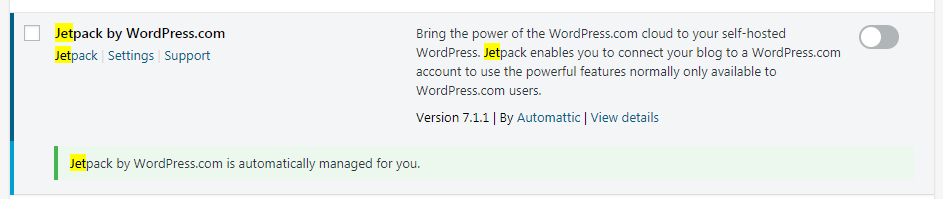
March 11, 2019 at 10:37 am #4471ParticipantI’m using wordpress.com so the Jetpack plugin is automatically managed for me. https://snag.gy/YGnAUK.jpg
I will ask the support line to disable it and see what happens.
Many thanks for your help!
March 11, 2019 at 11:04 am #4473ParticipantUpdate:
Wordpress support is unable to disable jetpack: “Jetpack is not something that we can remove from WordPress.com sites, as it is an integral part of how they work.”
They however told me to try and disable wordpress.com log-in (“turn the SSO feature off”). Now, when I try to log-in, I get a 401 error :
https://snag.gy/KhqSYu.jpgI tried a new registration and entered the log-in informations correctly multiple times, but to no avail.
March 12, 2019 at 4:04 am #4478KeymasterMarch 12, 2019 at 5:44 am #4480ParticipantHi there,
Registration is auto-approved so you should be able to create an affiliate account an try for yourself.
https://crypto-playing-cards.com/affiliate-home/affiliate-login/Just in case, I’ve sent you the credentials through the contact form.
Two things that are “weird”:
1. The login credentials received through e-mail after registration work fine on: https://crypto-playing-cards.com/wp-login.php
2. For some reason, I could no longer access the WP affiliate plugin tab in my dashboard plugin. It already happened before. All I could see was this: https://snag.gy/p09FoA.jpg
I had to reinstall the WP Affiliate manager to make it work, which in turn removed my WooCommerce tab. https://snag.gy/nW0sMO.jpg. This issue had already happened before and this is the explanation I received from support: “WP Affiliate manager and your affiliate-coupons plugin messed up WooCommerce when you removed them. I reinstalled WooCommerce again to fix it.“. WP Support hasn’t reinstalled WooCommerce so we have time to figure out what’s causing the problem.March 12, 2019 at 5:29 pm #4482ParticipantUpdate:
Just wanted to show you guys what happens when I try to access WooCommerce settings as the admin: https://crypto-playing-cards.com/wp-admin/admin.php?page=wc-settings
Screenshot: https://snag.gy/QhIcV1.jpg
March 12, 2019 at 8:08 pm #4483ParticipantUpdate bis: WP support de- and re-activated my WooCommerce plugin.
WP Support: I deactivated it and that caused a 500 error so I reactivated it to fix it. Let the plugin developer know this as well.
-
AuthorPosts


- You must be logged in to reply to this topic.